Making ICBC Case Tracking Easier to Follow
Independent product design exploration informed by my work at an acupuncture clinic using Jane App.
Jane is a clinic booking and practice management platform. While working at a clinic that used it every day, I noticed how much manual work went into tracking ICBC cases across appointments, approvals, session limits, and extensions.
I independently explored how Jane could support that workflow more directly, then tested the concept with five receptionists.
Problem
Receptionists relied on manual notes to understand where an ICBC case stood.
During busy shifts, they had to piece together approved sessions, visits already used, unsubmitted visits, expiry dates, and extensions across different parts of the workflow.
The information existed, but the current process made staff reconstruct the case themselves.
I wanted to explore a simpler question:
How might Jane make the status and next step of an ICBC case easier to understand?
Prototype
Validation Findings
5/5 completed the core flow
Set up the case and understood remaining and upcoming sessions without help.
5/5 struggled to find the ICBC reminder
All five struggled to reach the reminder through the task menu.
4/5 tried editing the original approval
They attempted to change the session count rather than add a new approval period.
Project Overview
Why this Problem
I saw the same workaround repeatedly while working at the clinic.
These firsthand observations helped shape the first hypothesis: treating an ICBC policy as one connected case could make its history and current status easier to follow.
I used usability testing later to evaluate whether that idea actually worked for receptionists.

Designing One Connected Case
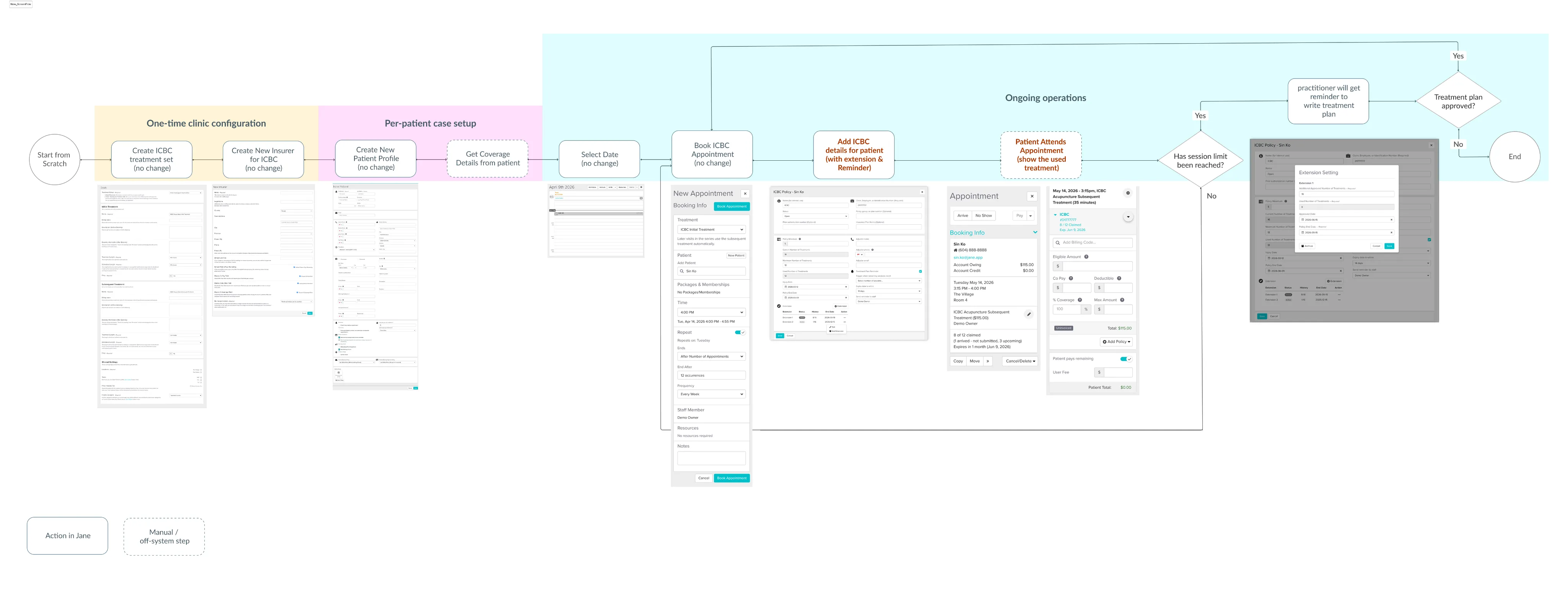
ICBC cases unfold over time. A patient might start with one approval, use several sessions, approach the limit, receive an extension, and continue treatment under a new approval period.
I designed the experience around that full lifecycle instead of treating each step as a separate task.
The case record followed four key moments:
Set up the case Add the initial policy and approved session count.
Check progress See claimed, unsubmitted, remaining sessions, and expiry details.
Prepare for the limit Remind staff before approved sessions run out.
Add an extension Add a new approval period while keeping the earlier approval history intact.
1. Keep History Visible and Make the Next Step Clear
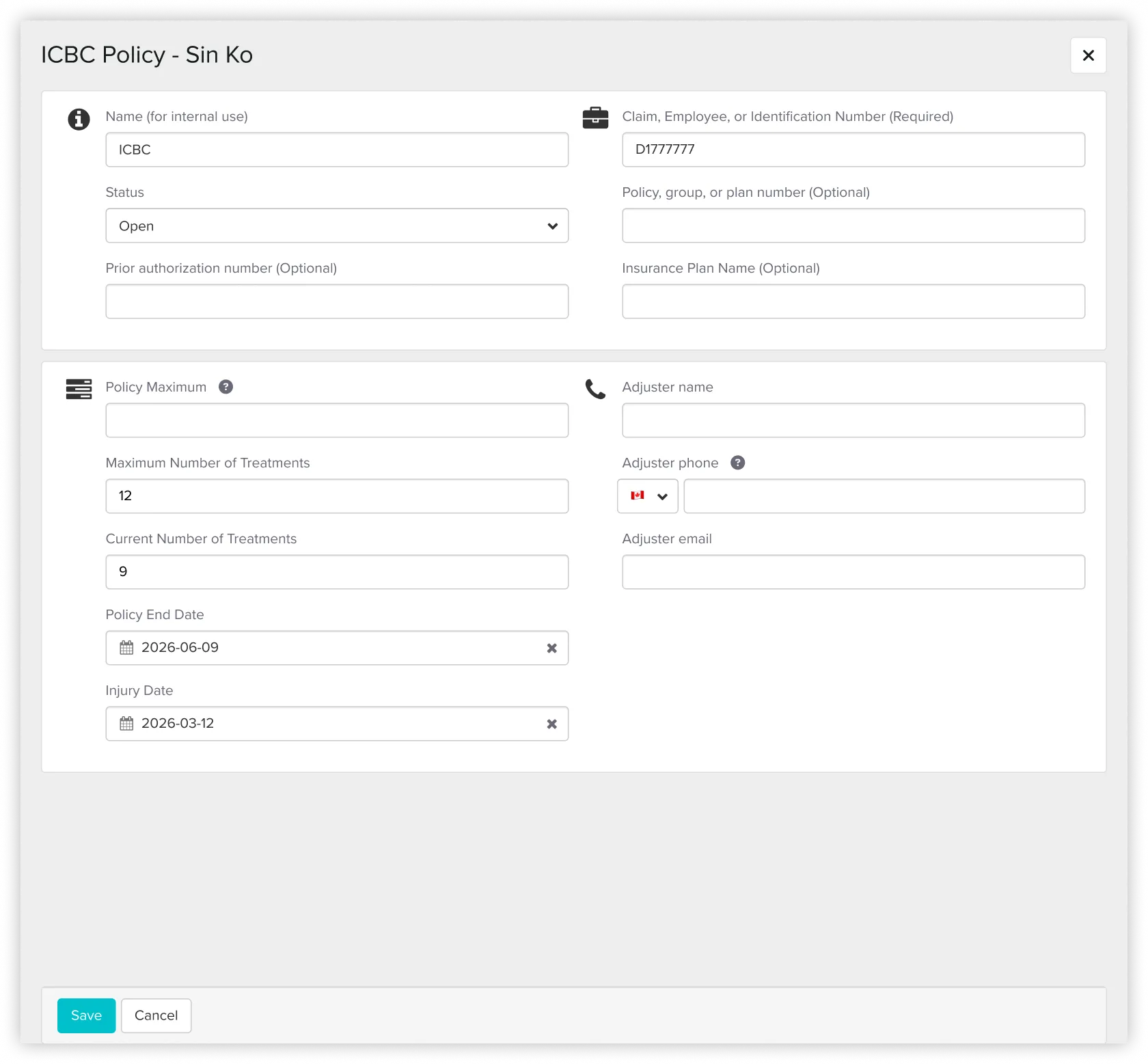
An extension could have been treated as an edit to the original approval. I chose to model it as a new approval period within the same case record instead. That preserved what had already been approved and gave staff a clearer history of how the case changed over time.
I introduced a treatment plan reminder so staff could prepare for an extension before the existing approval ran out.
This later became one of the most important findings in testing.
Before

After
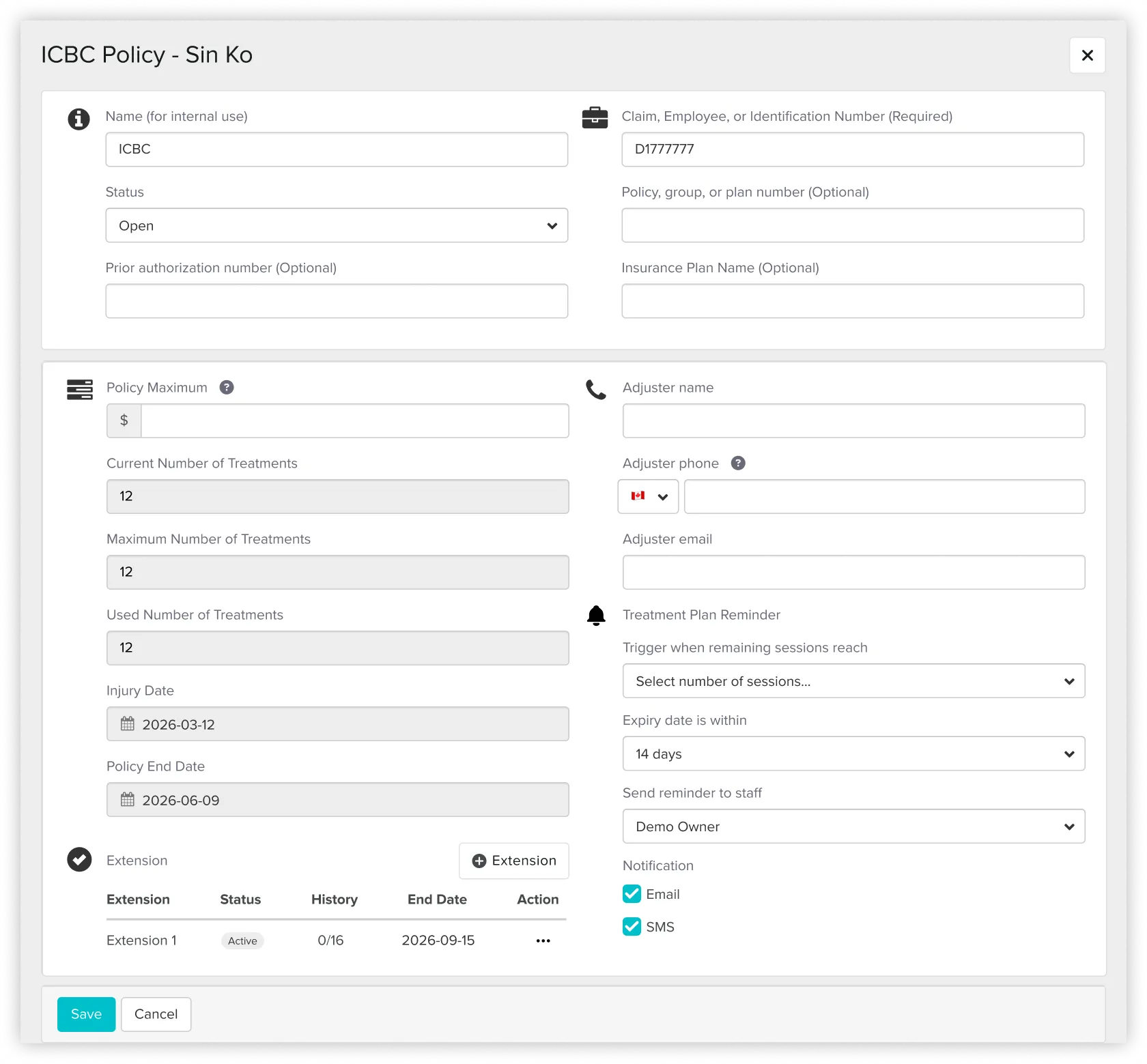

Tradeoff The case record becomes more detailed, but staff do not lose the original approval history when new sessions are added.
2. Put Case Status Where Staff Already Work
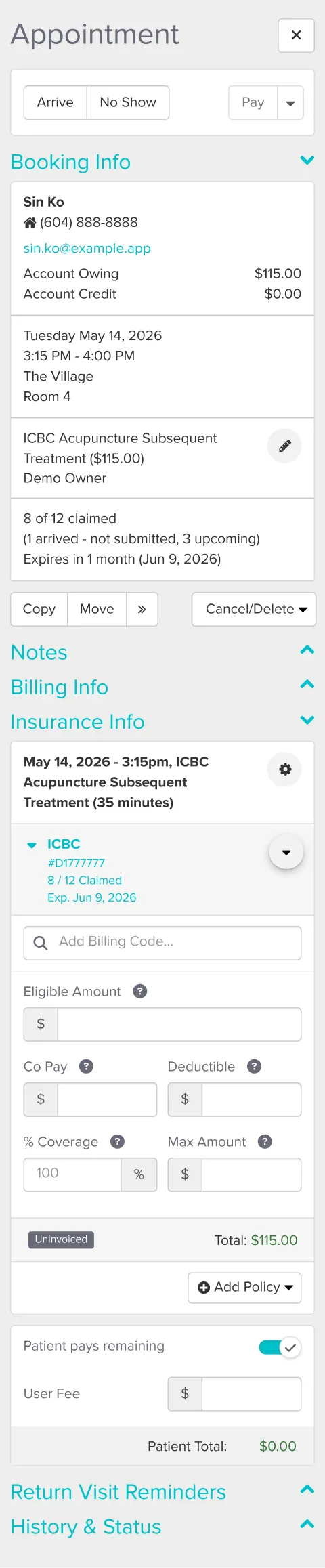
Receptionists often worked from the appointment view during busy shifts. Instead of making them open notes and reconstruct the case, I surfaced claimed sessions, unsubmitted visits, remaining sessions, and expiry details directly in the appointment view. The design was intended to make the current case status easier to understand at a glance.
Before


After

Usability Testing
I ran the reported usability testing on the HTML prototype with five receptionists. I used Figma to assemble the full end to end journey for review and to keep the broader flow consistent.
5/5 understood the case status
All five participants could set up a case and read claimed, unsubmitted, and remaining sessions without help.
But two interactions revealed repeated problems.
The Reminder Was Hard to Discover
- 5/5 struggled to find the ICBC reminder.
Participants had difficulty reaching it through the task menu. - Proposed response
Surface the reminder where staff already work, such as the appointment card or patient sidebar. - Still to validate
Whether the new placement improves discoverability without adding too much information to the screen.
Adding an Extension Looked Like Editing
- 4/5 tried changing the original approval.
Adding a new approval period was not the obvious next action. - Proposed response
Lock the original approval once the limit is reached and make Add extension the clear next step. - Still to validate
Whether the revised interaction makes the relationship between the original approval and the extension easier to understand.
Some Terminology Also Caused Hesitation
“Remaining sessions” was interpreted in two different ways, so the terminology needs another copy pass.
These findings define the next iteration. The proposed changes have not yet been retested.
What the Testing Changed
The testing showed that making case information visible was not enough.
Receptionists could understand the current state, but they still struggled when the next action was hidden or unclear.
That shifted my focus from simply surfacing information to making the transition between case states more explicit.
AI Workflow
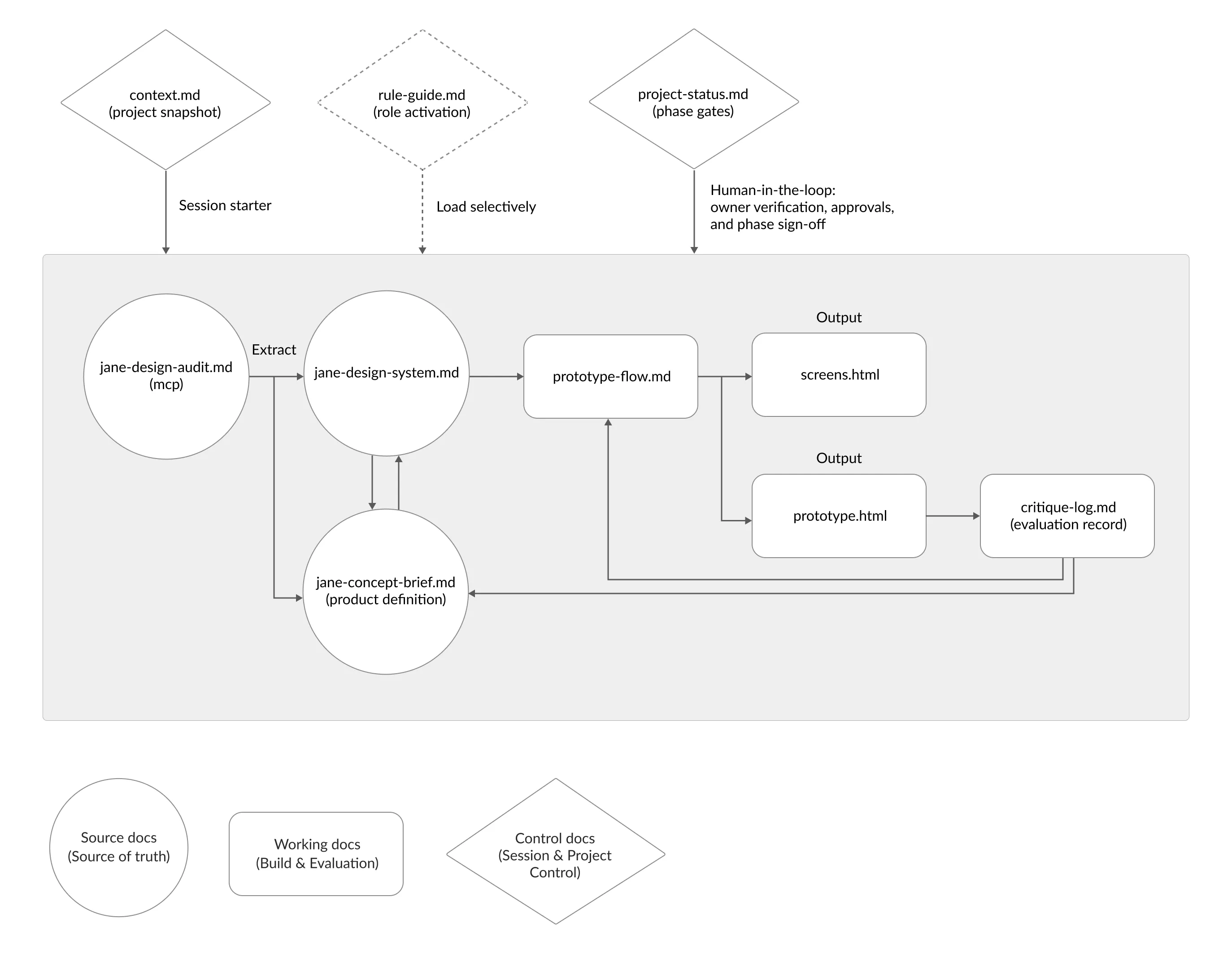
I used a structured markdown workflow with MCP, Claude, and Codex to keep product context, UI patterns, and critique consistent across the project.
When the ICBC journey became too complex for one generated prototype, I split the flow into smaller pieces and used Figma to assemble the full journey.
AI helped me move faster, but I kept the final product decisions grounded in clinic experience and usability testing.
Detailed workflow is on Substack & GitHub:
→ Part I: Building the markdown workflow (opens in a new tab)
→ Part II: Scaling the workflow to a harder feature (opens in a new tab)
→ View the template on GitHub (opens in a new tab)
Key Learnings
Designing from inside operations Working in the clinic helped me see gaps that were easy to miss from the interface alone.
A connected workflow still needs clear next actions Receptionists could understand case status, but finding reminders and adding extensions remained difficult. Making information visible did not automatically make the next step clear.
Know when the method stops scaling As the ICBC journey grew across multiple screens and workflows, the AI led approach became harder to keep consistent. I used Figma to assemble the full journey while testing the interactive HTML prototype.